Stop chasing the algorithm

Organize YouTube subscriptions into chronological Feeds. Save the videos that matter into Studies.

No algorithm. No recommendations. No Shorts. Just the channels you chose, in the order they published — plus a research notebook for the videos worth revisiting.

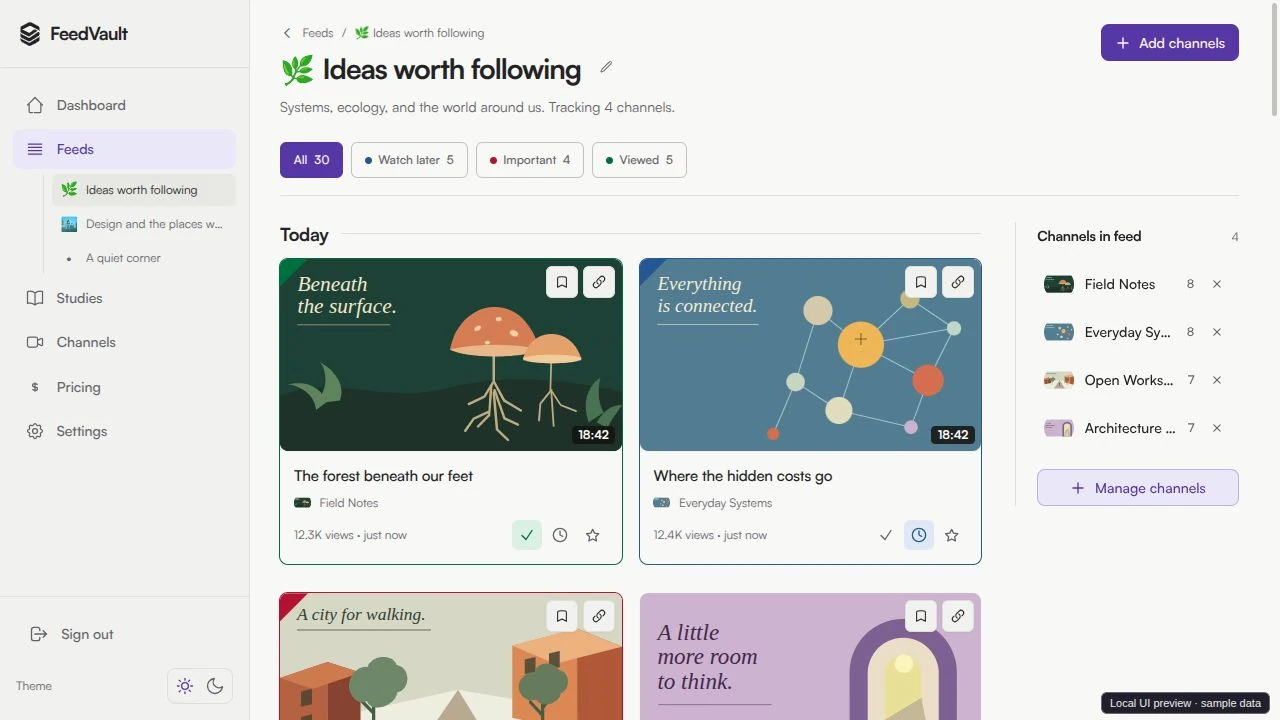
FeedVault feed view: chronological YouTube uploads from chosen channels, Shorts blocked.

You subscribed for a reason. The algorithm has other plans.

Long-form content buried, Shorts everywhere, recommendations pulling you off course.

Lost in the chaos

Important videos buried under algorithm suggestions

Wasted time

Scrolling endlessly to find the content you actually want

No focus

Distracted by irrelevant content when you need to learn

Shorts hijack your feed

Long-form videos buried under an endless wall of vertical clips you never asked for.

Your subscriptions are a list you chose. Treat them like one.

Two simple concepts: Feeds for keeping up, Studies for going deep.

Chronological, no algorithm

Newest videos at the top, oldest at the bottom. The subscription feed YouTube never gave you.

Shorts blocked at the door

Anything three minutes or shorter never enters your feed. Not hidden — never ingested.

Notes on saved videos

Save a video into a Study, jot down why. Your research notebook for YouTube.

Emoji icons per Feed & Study

Pin an emoji to every Feed and Study so you can find them at a glance. 💻 🎵 🍳 📚

Feeds for keeping up. Studies for going deep.

One pair of ideas. Both first-class. Use them together.

Feeds

channels in

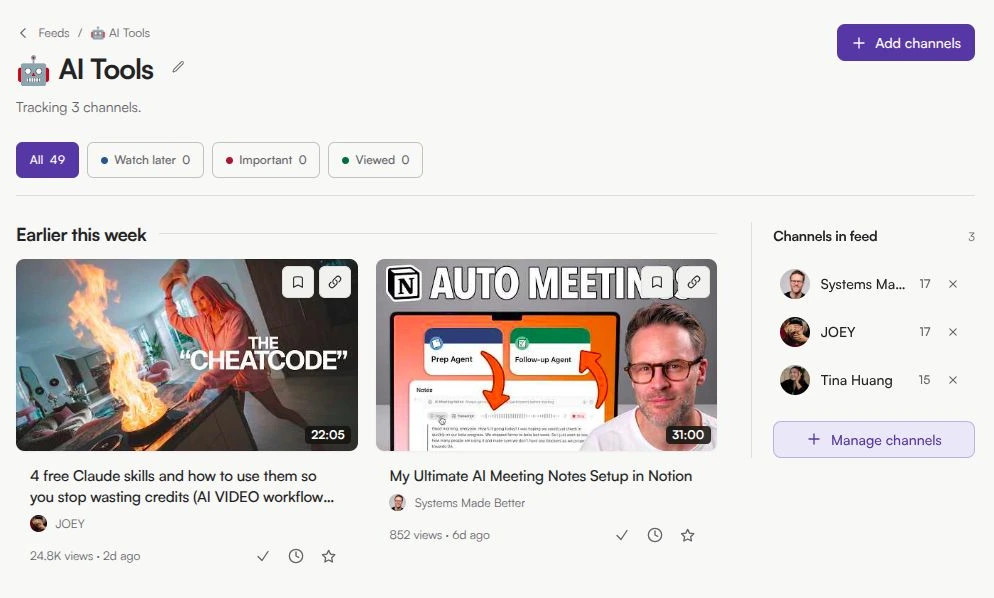
A Feed is a named bucket of YouTube channels — say, Web Dev Channels 💻 or Cooking 🍳. Every new upload from those channels lands in the Feed automatically, sorted by publish date.

  • Group channels by topic, project, or mood
  • Newest first, always — no algorithm in between
  • Shorts never enter the Feed
  • Pin an emoji icon for quick recognition
A Feedvault feed showing chronological YouTube uploads from chosen channels, with durations and a channels sidebar. Shorts blocked.

Studies

videos in

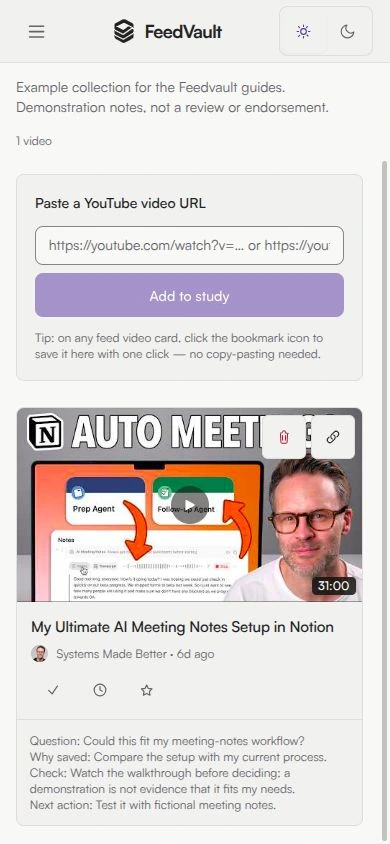
A Study is a hand-picked collection of individual videos with notes — your research notebook for YouTube. Save a tutorial, a talk, a recipe, with a free-text note on why it matters.

  • Paste a YouTube URL, or click save on any video card in a Feed
  • Free-text note on every saved video
  • Watch later, important, viewed flags per video
  • Pin an emoji icon — 📚 🎯 🔧 🧠
A Feedvault study named Health: a URL input for saving videos, saved video cards, and a free-text note field on each one.

Example: keep a Feed for Web Dev Channels 💻 to see what your favourite creators just uploaded — then save standout videos into a Study called React Performance 📚 with a note about why you saved each one.

Build your Feeds. Save into Studies. Watch with focus.

No browser extension to install. No mobile gap. Works on any device with a browser.

1

Build your Feeds

Create a Feed per topic, give it an emoji, and drop in YouTube channels. New uploads stream in automatically — newest first, no Shorts, no algorithm.

2

Save into Studies

Spotted something worth revisiting? Click the save icon on any video card, or paste a YouTube URL into a Study. Add a free-text note about why you saved it.

3

Filter, flag, focus

Mark videos as watch-later, important, or viewed. Filter by date range, channel, or topic. Zero filler, zero suggestions — just the content you chose.

The subscription feed YouTube never gave you

Same idea as YouTube's subscription tab — but scoped to exactly the channels in each Feed, ordered by date, with no recommendations pulling you off course and no Shorts cluttering the page.

Everything you need, nothing you don't

Built for power-users who already hate the algorithm and want focus, not infinite scroll.

Channels into Feeds

Group your YouTube channels into named Feeds by topic, project, or mood. Every Feed is chronological. No algorithm decides what you see.

Videos into Studies

Save individual videos into a Study — paste a YouTube URL, or one-click save from any video card in a Feed. Your research notebook for YouTube.

Shorts blocked at the door

YouTube Shorts (≤3 minutes) are filtered out at ingestion. They never enter your Feed. Not hidden in CSS — never fetched in the first place.

Notes on saved videos

Every video saved into a Study can carry a free-text note. Why you saved it. What to revisit. The bit at 14:32 that mattered.

Emoji icons per Feed & Study

Pin an emoji to every Feed and Study. 💻 for Web Dev, 🍳 for Cooking, 📚 for that React Performance research. Your sidebar at a glance.

Watch-later, important, viewed

Three flags per video to track where it sits in your queue. A real watch-later that doesn't disappear. An important flag for the videos you'll come back to.

How Feedvault compares to other YouTube tools

Most tools fix one thing. Feedvault fixes the whole subscription experience.

Feature YouTube subscriptions Unhook (extension) PocketTube (extension) Feedvault
Group channels into chronological Feeds
Shorts blocked at ingestion (not just hidden) UI hide only UI hide only
Save videos with free-text notes (Studies)
Standalone web app — no browser extension to install
Works on mobile out of the box via app
No algorithm, no recommendations partial
Per-feed and per-study emoji icons
Doesn't break when YouTube ships an update fragile fragile

Information accurate as of 2026. PocketTube and Unhook layer on top of YouTube's web interface. They're powerful, but they depend on YouTube's frontend, so they can break when YouTube ships interface updates, and many users find their UIs cluttered. Unhook is desktop-only; PocketTube adds iOS and Android apps but still sits on top of YouTube rather than replacing the feed.

Why I built Feedvault. I'm a heavy YouTube user. I follow channels to learn, but the home feed kept burying their uploads under Shorts and recommendations I never asked for. I wanted the simple thing YouTube stopped giving us: the channels I chose, newest first, no Shorts, plus a place to keep the videos worth returning to. So I built it, and I use it every day. That tool is Feedvault.
Erik, Founder of Feedvault

Simple, honest pricing

Pay yearly, or pay once for life. No ads, no upsells, no algorithm.

Annual

1 Year Access

$99 /year

Equivalent to $8.25/month

  • Unlimited Feeds & Studies
  • 500 channels
  • Shorts blocked at the door
  • Notes on saved videos
  • Priority support
Get Annual
Best Value

Lifetime

One-Time Payment

$599 one-time

Pay once, use forever

  • Everything in Annual
  • Lifetime access — never pay again
  • All future features included
  • Early access to new features
  • Shape the product roadmap
Get Lifetime
Cancel anytime Your data stays yours Secure payment with Creem

Learn smarter. Watch with purpose.

Whether you're studying for exams or curating a safe viewing environment for your kids, Feedvault puts you in control of what gets watched.

For Students

YouTube is packed with incredible educational content — but the algorithm keeps pulling you into rabbit holes. Feedvault lets you build a structured learning feed, completely free from distractions and Shorts.

Organize by subject

Create a Feed per course — Math, History, Science. Your study content stays in one place, always ready to review.

Save key lectures into Studies

Found a lecture worth revisiting? Save it into a Study with a note about which topic it covers. Build your own revision pack.

No algorithm rabbit holes, no Shorts

Only videos from channels you chose. No recommendations, no autoplay traps, no ≤3-minute clips — just the educational content you need.

Build your own curriculum

Group channels from multiple creators into a single focused Feed — your personal, curated course on any topic, with an emoji to find it fast.

For Parents

You want your children to learn, not to get lost in endless autoplay or vertical Shorts. Feedvault gives you the tools to curate exactly what they watch — and nothing else.

Curate safe, approved channels

Hand-pick the channels your children can watch. Science, art, coding, languages — you choose the creators, they explore the content.

Separate Feeds for different ages

Have kids of different ages? Create a dedicated Feed for each child, tailored to their grade level and interests, with their own emoji.

No surprises, no Shorts

Feedvault only shows content from channels you approved, and Shorts are blocked at the door. No algorithm pulling kids toward unvetted videos.

Stay up to date on new uploads

Know exactly when your kids' favorite educational channels post new content, so learning stays fresh and engaging.

Start for Free

Free to try. No credit card required.

Frequently Asked Questions

What is Feedvault?

Feedvault is a YouTube subscription organizer that groups channels into chronological Feeds and saves individual videos into Studies. No algorithm, no recommendations, no Shorts — just the videos from channels you chose, in the order they published.

What is the difference between Feeds and Studies?

Feeds are collections of YouTube channels — every new upload from those channels lands in the Feed automatically, sorted by date. Studies are collections of individual videos you save by hand, with a free-text note on each one. Feeds are for keeping up; Studies are your research notebook.

Are YouTube Shorts shown in my feed?

No. Feedvault blocks Shorts at ingestion — any video three minutes or shorter never enters your feed. Most tools (like Unhook) hide Shorts in the YouTube interface; we refuse to ingest them in the first place, so they cannot appear no matter what device you use.

Can I save individual videos with notes?

Yes. Save a video into a Study by pasting its YouTube URL, or click the save icon on any video card in a Feed. Each saved video can carry a free-text note — "why I saved this", a timestamp, a reminder.

How is Feedvault different from PocketTube or Unhook?

PocketTube and Unhook both layer on top of YouTube. Unhook is a desktop browser extension; PocketTube is an extension with companion iOS and Android apps. Both depend on YouTube's frontend, so they can break when YouTube ships updates. Feedvault is a standalone web app you open instead: nothing to install, works in any browser on phone or laptop, and combines grouped chronological Feeds, Shorts blocking at ingestion, and per-video notes in Studies. PocketTube has folders and can hide Shorts inside YouTube's interface but has no per-video notes; Unhook only hides things in the UI.

What channels can I import?

Any public YouTube channel. Paste the URL or search by channel name.

Do you store my watch history?

No. We only store your Feeds, Studies, saved videos, and notes. Your YouTube watch history stays private.

Can I cancel anytime?

Yes, cancel anytime. Export your Feeds and Studies if you decide to leave.

Your focused YouTube starts here

Chronological Feeds. Studies for the videos that matter. No algorithm. No Shorts.

Create Your Feedvault Now