PocketTube alternative: PocketTube vs Feedvault
Quick answer
PocketTube is the stronger fit when you want folders, filters, sorting, Deck mode, and watched controls inside YouTube. Feedvault is the stronger fit when you want a separate browser-based workspace with chronological topic Feeds and Studies for saved videos with notes. Both organize channels, but they solve the problem from different places.
A useful PocketTube alternative should not pretend PocketTube is only a folder extension. Its official site reports 300,000+ users and offers desktop extensions, mobile apps, group feeds, video filters, sorting, watched controls, and channel-management features. Feedvault takes a different route: leave the YouTube interface behind and use a dedicated workspace for following and studying the channels you chose.
Improve YouTube, or use a separate workspace?
That decision matters more than the number of checkmarks in a feature table.
Choose PocketTube when
You want to keep working inside YouTube
- You want custom groups and group feeds integrated with YouTube.
- You need duration, date, popularity, content-type, or watched filters.
- You want Deck columns, bulk channel management, notifications, or playlist tools.
- You prefer a free tier or a lower-cost premium subscription.
Choose Feedvault when
You want YouTube to become a research source
- You want a separate surface rather than another layer inside YouTube.
- You want chronological Feeds for chosen topic groups.
- You need Studies for saving individual videos with free-text notes.
- You want browser access on desktop and mobile without installing an extension or app.
Keep a useful reference from a topic you follow
Before rebuilding your folders, try one topic you already check. The task is simple: find a relevant upload, then keep the video with a reason to return to it.
In PocketTube
Open a subscription group and use its feed, filters or sorting to find a video. This is a strong fit if managing what you watch inside YouTube is the whole task. Use your existing note-taking tool when you need a written reference.
In Feedvault
Create a topic Feed and add a few public channels manually. Create a Study for the project. On a relevant Feed video, choose Save to study, select that Study, then open it and choose + Add a note. Write why you saved the video and choose Save note.
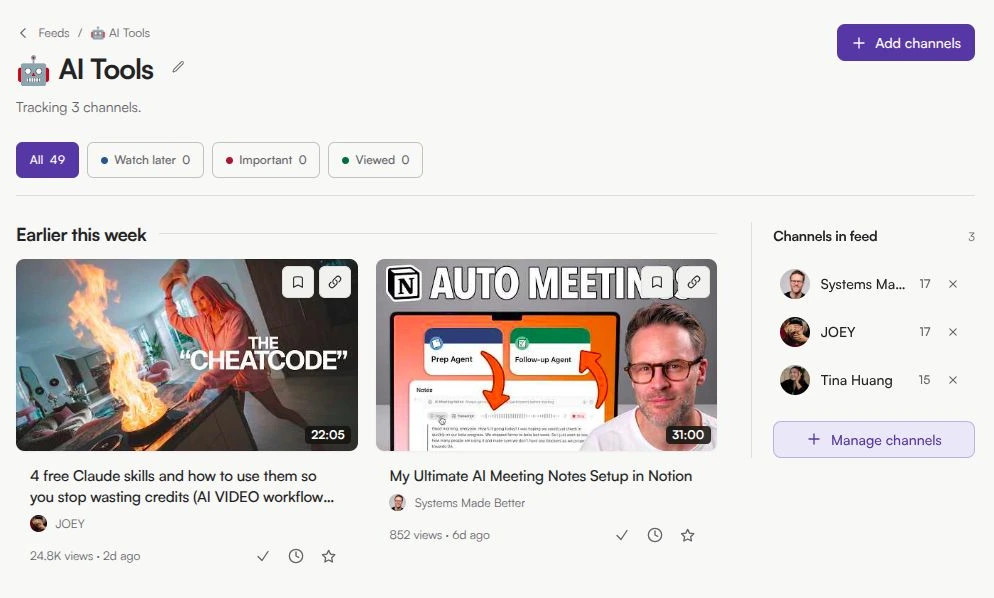
The useful test comes later: reopen the Study and check whether your note helps you continue the project. Follow the save-and-note walkthrough to try that second part. Keep PocketTube available while you decide whether the added routine is worth a paid workspace.
PocketTube vs Feedvault feature comparison
PocketTube has more in-YouTube management features. Feedvault has the distinct standalone-workspace and saved-notes workflow.
| Capability | PocketTube | Feedvault |
|---|---|---|
| Product model | Extensions + mobile apps | Standalone web app |
| Group YouTube channels by topic | ||
| Live feed for each channel group | ||
| Video sorting and filters | Broad duration, date, popularity, topic and content filters | Publish-date order with Feed, channel and status workflow |
| Multi-column Deck view | ||
| Watched or viewed status | ||
| Save selected videos with free-text notes | Not advertised as a core feature | |
| Shorts handling | Remove or filter on supported YouTube pages | Best-effort likely-Shorts filter in Feedvault Feeds |
| Separate from the YouTube interface | Desktop tools integrate with YouTube | |
| Mobile access | iOS and Android apps | iOS and Android browsers |
| No extension or app installation | ||
| Free tier | ||
| Advertised paid price | $3.99/month displayed; annual option available | $7/month or $59/year |
| One-click PocketTube group import | Not applicable |
PocketTube information was reviewed on 17 October 2026 from its official product site, pricing page, and Chrome Web Store listing. Prices and capabilities can change. Feedvault’s Shorts filter is a heuristic, not YouTube’s native Shorts label or a perfect guarantee.
How to switch from PocketTube to Feedvault today
There is no one-click migration yet. The honest path is manual, so keep PocketTube available until you have checked the Feeds you need.
- 1
List the PocketTube groups you actually use
Do not recreate every historical folder automatically. Start with the active topics you still check.
- 2
Create matching Feed names in Feedvault
Use the same topic names at first. Add emoji icons later if they help you scan the sidebar.
- 3
Add public channels by URL or handle
Use each PocketTube group as a checklist. PocketTube’s CSV export can be a reference, but Feedvault does not currently import the file or its group assignments.
- 4
Move only the videos worth keeping into Studies
Studies are not a copy of your entire YouTube history. Use them for selected videos that need notes, follow-up, or repeated reference.
From subscription folders to a learning system
The reason to pay more for Feedvault is not that it has more subscription-management controls. PocketTube has more of those. The reason is the workflow that connects discovery and retention in one separate workspace.
Feeds for ongoing topics
Group channels by subject and check eligible uploads in publish-date order.
Studies for selected videos
Save individual videos with notes instead of turning every interesting upload into another undifferentiated queue.
Likely Shorts filtered in Feeds
Feedvault uses duration and player shape as a best-effort filter. It does not modify YouTube or guarantee perfect classification.
Watch-later, important, viewed
Use one status per video to decide what needs attention and what is already complete.
PocketTube alternative questions
Is Feedvault a PocketTube alternative?
Yes, for people who want to group YouTube channels and follow their uploads by topic. PocketTube adds groups, feeds, filters, sorting, and management tools to the YouTube experience through extensions and mobile apps. Feedvault is a separate web app with chronological Feeds and Studies for saved videos with notes.
What is the main difference between PocketTube and Feedvault?
PocketTube is designed to improve subscription management inside YouTube. Feedvault is designed to give you a separate learning and research workspace outside the YouTube interface. PocketTube has the broader set of in-YouTube management tools; Feedvault combines topic Feeds with saved-video notes.
Which is better: PocketTube or Feedvault?
Choose PocketTube when you want folders, filters, sorting, Deck mode, and watched controls inside YouTube. Choose Feedvault when you want a standalone browser-based workspace, chronological topic Feeds, and Studies for saving videos with notes. Neither is the better fit for every workflow.
Can Feedvault import my PocketTube collections?
No. Feedvault does not currently provide a one-click PocketTube import. PocketTube can export subscriptions to CSV, but Feedvault does not ingest that file or preserve PocketTube group assignments. To switch today, recreate each Feed and add its public channels by URL or handle.
Does PocketTube work on mobile?
Yes. PocketTube provides iOS and Android apps in addition to desktop browser extensions. Feedvault works in a mobile browser without installing a separate app.
Is PocketTube cheaper than Feedvault?
Yes. PocketTube has a free tier, and its official pricing page advertises Premium at $3.99 per month, with an annual-payment option. Feedvault is paid at $7 per month or $59 per year. The products cover overlapping but different workflows.
How do PocketTube and Feedvault handle YouTube Shorts?
PocketTube can remove or filter Shorts on supported YouTube pages. Feedvault does not alter YouTube; it applies a best-effort duration-and-shape filter for likely Shorts inside Feedvault Feeds. Feedvault can misclassify some short videos because it does not use YouTube’s native Shorts label.
Continue comparing workflows
- Organize study and entertainment channels — try free bookmark folders and playlists before choosing a manager.
- Organize YouTube subscriptions by topic — set up free bookmark folders or a browser-based topic Feed.
- Unhook alternative — compare a YouTube cleanup extension with a separate subscription workspace.
- YouTube Watch Later alternative — organize selected videos with notes, flags, and topic groups.
- Save YouTube videos with notes — compare Feedvault with deeper note-taking and annotation tools.
- Alternative to the YouTube subscription feed — compare bookmarks, RSS readers, alternative clients, and Feedvault.
- How to reduce or block YouTube Shorts — compare settings, extensions, clients, and Feedvault’s Feed filter.
- Feedvault pricing — Plus Monthly at $7/month or Plus Annual at $59/year.