A YouTube Watch Later alternative with notes and topic groups
Quick answer
Start with YouTube Watch Later for a simple queue, or Playlists for topic groups. If you also want private notes, compare a notes app, Raindrop or Feedvault Studies. Feedvault lets you save eligible videos by URL or from a Feed, then open a Study to add your note.
If you open a saved video and cannot remember why you kept it, the missing piece may be your own context. Feedvault Studies groups selected videos by project, with a free-text note and watch-later, important or viewed status. Playback opens on YouTube.
Look at what is missing from your queue
The number of saved videos does not decide whether you need another tool. These are more useful signs:
- Projects are mixed together. Your next work tutorial sits beside recipes and weekend viewing. Separate YouTube playlists may already solve this.
- The reason is missing. A title tells you the subject, but you want to record which problem, question or decision made you save it.
- The next action is unclear. You want to distinguish something to watch from a reference you have already used.
Feedvault provides a separate place to choose and organize videos. Watching still takes you to YouTube, where its watch-page recommendations may appear. Saving a link in either service does not archive the video.
Start with five useful videos
Choose five references for one current project. Five is a manageable starting exercise, not a limit. Leave the original Watch Later list in place while you try the new routine.
- Give the project a Study. Create one named for what you are doing, such as “Home recording setup” or “Learn CSS layout.”
- Add each video manually. Copy its YouTube URL, paste it into the Study and choose Add to study. The current interface does not bulk-import Watch Later.
- Keep one reason per video. On the saved card, select + Add a note, write what you intend to use, and choose Save note. For example: “Check this setup before buying a microphone.”
- Use the collection on your next project session. Reopen the Study, choose the reference that serves the task, and watch it on YouTube. Update its note or status after using it.
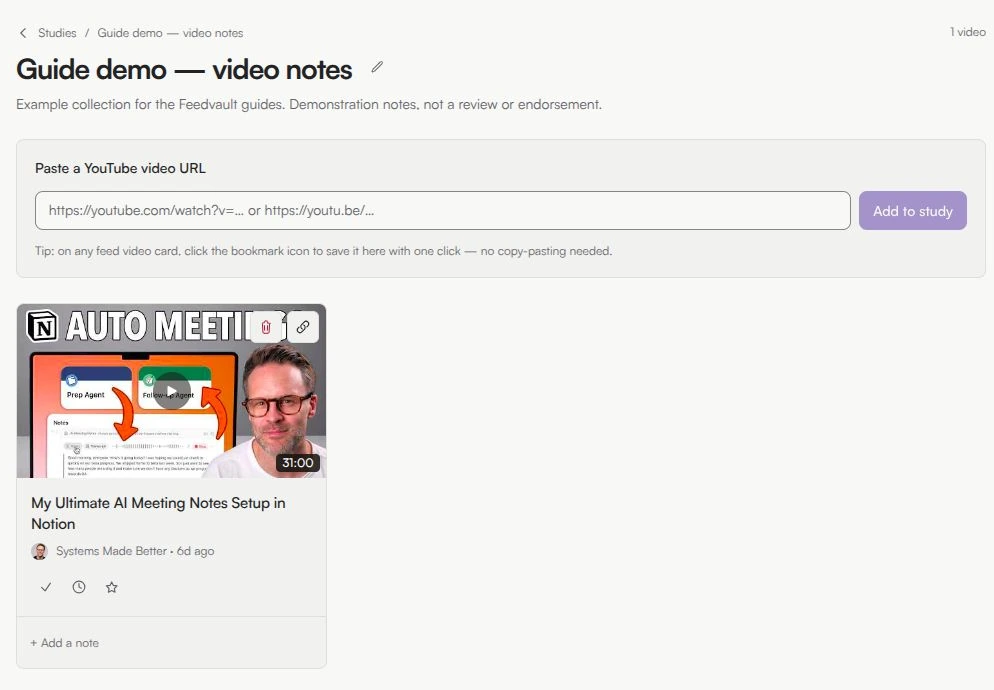
The save-and-note walkthrough shows the exact steps and includes a free template. If you also need new uploads from these sources, organize their channels into a Feed.
Five real ways to save YouTube videos for later
From the default to a purpose-built research notebook.
YouTube Watch Later
Native YouTube · Free · All devices
Use the built-in queue when you mainly want to save something to watch later. YouTube explains how to add and remove Watch Later videos.
YouTube Playlists by topic
Native YouTube · Free · All devices
Make playlists named "React Performance", "Cooking Tutorials" or "Talks to Rewatch" and save videos into them. Follow YouTube's playlist creation instructions if topic grouping is all you need.
Raindrop or another bookmark manager
Web app · Freemium · All devices
Raindrop organizes bookmarks into collections with tags, Markdown notes, note search and export. It supports video previews and mobile saving; a bookmark is not a backup of the video itself.
Notion as a video log
Web app · Freemium · All devices
A Notion database can hold saved video links, topic fields, status and your own notes. Google’s notebook tool is a different workflow: source-grounded analysis of eligible material, including transcripts from supported public YouTube videos.
Feedvault Studies — videos with personal context
Web app · Paid · Any device
Studies are collections of individual saved videos with free-text notes. Multiple Studies grouped by topic with emoji icons (📚 React Performance, 🎯 Talks to Rewatch). A status for each video: watch-later, important, viewed. Save by pasting a YouTube URL — or save directly from a video card in a Feed.
What do you need beyond a queue?
| Your need | Start here | What to expect |
|---|---|---|
| One viewing queue | YouTube Watch Later | Free, built into YouTube. No extra extension or migration. |
| Simple topic groups | YouTube playlists | Free, with playback on YouTube. Keep per-video personal notes separately if you need them. |
| Video links beside other project material | A document, notes app or bookmark manager | Use a free tool or an existing plan. You choose the capture process and structure; check the product's current limits. |
| Chosen-channel uploads and personal video notes | Feedvault Feeds and Studies | $7/month or $59/year after a seven-day trial with no card required. Desktop/mobile browser; no extension required. Playback opens on YouTube. |
| Move an existing Watch Later backlog into Feedvault | A small manual selection | Paste individual video URLs into a Study. There is no bulk Watch Later import in the current interface. |
Feedvault terms checked 17 October 2026. See current pricing for trial and plan details.
Studies — a research notebook for YouTube
Studies group selected videos by topic or project, with a free-text note and watch-later, important, or viewed status. Open a Study to return to that context. Playback opens on YouTube, and source videos can become unavailable; a Study is not a video archive.
Multiple Studies per topic
📚 React Performance · 🎯 Talks to Rewatch · 🍳 Recipes to Try. Each one focused, each one with its own emoji.
Notes per saved video
"The bit at 14:32 about useMemo." "Watch before the team meeting." Free-text, no template.
A status for each video
Watch-later, important, viewed. A real watch-later that doesn't blur into your "I'll get back to this someday" pile.
Save from a URL or Feed
Paste a YouTube URL, or click the save icon on any video card in a Feed. Open the Study after saving to add your note.
Common questions
Can Feedvault import my whole Watch Later list?
There is no bulk Watch Later import in the current interface. Start by adding a few useful video URLs to a Study manually. Keep your original YouTube list while you decide whether the new workflow helps.
When might I need more than YouTube Watch Later?
Watch Later is useful as a single queue. If you need separate topic collections and private notes about why each video matters, compare playlists, a notes app, a bookmark manager or Feedvault Studies.
What is the best alternative to YouTube Watch Later?
For a simple topic list, try YouTube Playlists. Raindrop offers collections and Markdown notes; a Notion database gives you custom fields. Feedvault pairs topic-based channel Feeds with selected videos, free-text notes and status flags in Studies.
Can I save YouTube videos with notes?
You can keep a video link and your own notes in a notes app or bookmark manager. In Feedvault, save an eligible video into a Study, then add a free-text note. You may type a timestamp manually.
How is a Study different from a YouTube Playlist?
A Study is a collection of selected videos with your own notes and watch-later, important or viewed status. A YouTube Playlist groups videos on YouTube. Feedvault playback also opens on YouTube.
Can I have multiple collections by topic?
Yes. Create separate Studies for your topics or projects, and save selected videos into them.
What happens if a saved video becomes unavailable on YouTube?
Feedvault is an organization tool, not a video archive. It does not guarantee access to a video or a retained metadata record after the source becomes unavailable. Keep essential reference notes in a form you can retain independently.
Keep reading
- Build a YouTube research workflow
- How to organize YouTube subscriptions — bookmark folders or a topic Feed, step by step.
- How to block YouTube Shorts — six methods compared.
- PocketTube alternative — direct comparison of PocketTube and Feedvault.
- Unhook alternative — Feedvault vs Unhook.
- Save YouTube videos with notes — the save-and-note walkthrough and a free template.
- YouTube without the algorithm — manifesto for bypassing the YouTube algorithm entirely.
- Alternative to the YouTube subscription feed — rebuild a chronological subscription feed.
- Distraction-free YouTube — complete guide mapping distractions to tools.
- Feedvault home — Feeds + Studies overview.
- Pricing — Plus Monthly at $7/month or Plus Annual at $59/year.