Save YouTube videos with a note about why they matter
Quick answer
In Feedvault, save a YouTube video into a Study, then select “+ Add a note” on its saved card. Write why it matters and choose “Save note.” Your note stays with that reference in the Study. You can also keep a video URL and your own notes in a document or the free timestamp notebook below.
A saved title tells you what the video is. Your note tells you why to return. Keep selected videos together by topic or project, then add the detail you want to remember. Videos open on YouTube when you are ready to watch.
Save the video first. Then add your reason.
Start with one video you expect to use for a project. A Study is the collection that holds the saved video and your note. This works in a desktop or mobile browser without installing an extension.
Save into a Study
Create or open a Study for your project. Paste the video's YouTube URL and choose Add to study. If the video is already in a Feed, use its Save to study bookmark button and choose an existing Study.
Write your own note
Open the Study and select + Add a note on the saved card. The field asks “Why did you save this?” Write your reason, then choose Save note. Saving the video and editing its note are separate actions.
Return when the project needs it
Reopen the Study and read the saved context before choosing a video. Playback opens on YouTube. A time you type into the note is a manual reference; Feedvault does not capture the playback position for you.
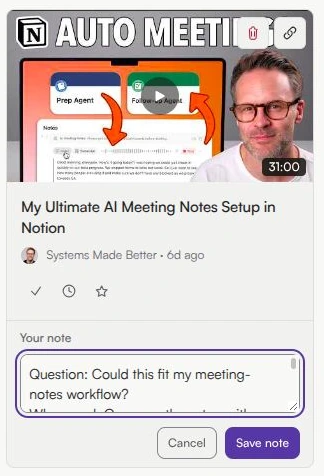
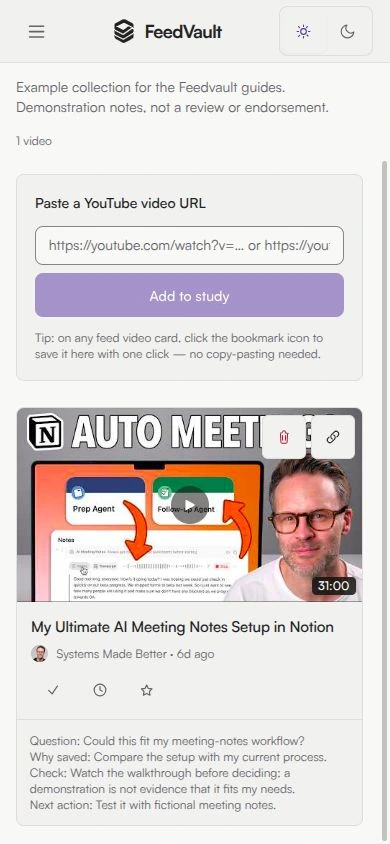
Example: evaluate a workflow before adopting it
Our demonstration saves My Ultimate AI Meeting Notes Setup in Notion by Systems Made Better and adds a personal question:
“Could this fit my meeting-notes workflow? Compare the setup with my current process. Watch the walkthrough before deciding: a demonstration is not evidence that it fits my needs. Next action: test it with fictional meeting notes.”
This is an example note written for the guide. Feedvault stores the note; it does not generate or evaluate the tutorial.
A free personal-note template
Select and copy these prompts into a Study note or the notes app you already use. Keep only the lines that help you return to the source.
Source URL:
Why I saved this:
Moment to revisit (manual time, optional):
What I need to check:
My next action:
For several moments in one video, use the free YouTube timestamp notebook. Enter times manually and download your notes as Markdown, text or JSON. It is a separate browser tool; its optional device saving does not sync with a Feedvault account.
Choosing a home for an existing backlog? See the five-video Watch Later transition. Following recurring sources for a project? Use the source-monitoring workflow.
Five real ways to save YouTube videos with notes
From quick capture to deep annotation. Pick by how heavy your note-taking actually is.
A notes app or a simple document
Web app · Freemium · All devices
Keep a video link, topic, and your own notes together in a document or notes app. This gives you flexible writing without setting up Feedvault; track new channel uploads separately.
Raindrop bookmarks and notes
Web app · Freemium · All devices
Raindrop saves bookmarks into collections with tags, Markdown notes, note search and export. It also supports video previews and mobile saving.
ClipMargin
Chrome extension · Free during its early stage
ClipMargin attaches notes to video timestamps and keeps them in a searchable library. Its official site currently advertises free early-stage access.
Google's notebook tool for source analysis
Web app · Freemium · All devices
Google’s notebook tool can work with transcripts from supported public YouTube videos as sources. This is a source-analysis workflow, separate from a customizable Notion database.
Feedvault Studies — selected videos with your own notes
Web app · Paid · Any device
Save a video into a Study by pasting a YouTube URL or using the save button on an eligible Feed video. Then open the Study to add your note. Keep collections by topic or project and choose watch-later, important or viewed status for each video.
Pick the tool that matches your habit
There's no single best tool — there's a best tool for how you actually take notes. Here's a quick way to choose.
If you take heavy timestamped notes
Use ClipMargin. They are purpose-built for active note-taking while you watch.
If you want AI summaries
Consider Google’s notebook tool for supported source material, and verify the result against the original.
If you save dozens of videos a week with quick notes
Consider Feedvault Studies when you also want to follow selected channels in topic Feeds.
Studies — keep the video and your next action together
Save an eligible video from a Feed or add its URL inside a Study. Then add a free-text note about why it matters. Studies group selected videos by topic or project; open the Study when you want to return to your notes.
Save directly from a Feed
See a video in your Feed worth keeping? Click save, choose an existing Study, then open the Study to add your note.
Free-text note per video
Write what you want to remember. You can type a timestamp yourself; timestamps are not captured automatically.
Multiple Studies with emoji icons
📚 React Performance · 🎯 Talks to Rewatch · 🔧 Tools to Try. Name each Study for the topic or project you want to revisit.
A status for each video
Mark a video watch-later, important, or viewed to keep track of your progress.
Common questions
Can I take notes on YouTube videos?
Use a notes app, a document, a bookmark manager or a video-annotation tool. Feedvault lets you add a free-text note to a video saved in a Study.
What is the best way to save YouTube videos with notes?
Choose around your workflow. A notes app is flexible, Raindrop combines bookmarks and Markdown notes, and ClipMargin offers timestamped annotation. Feedvault pairs chosen-channel Feeds with selected videos and simple notes in Studies.
Does Feedvault capture timestamps or generate summaries?
No. Notes are free text. You can type a timestamp yourself, but Feedvault does not capture timestamps automatically or generate AI summaries or transcripts.
Where do my notes live?
Open the Study containing the saved video. Your note is attached to that saved item in the Study. Feedvault is not a video archive; do not rely on it as a backup of unavailable YouTube content.
Can I save a video and write a note in one step?
Save an eligible video from a Feed into an existing Study, or add its YouTube URL inside a Study. Then open the Study and add your note. Saving and editing the note are separate steps.
How is this different from Notion or NotebookLM?
Notion can hold a customizable database of video links and your notes. Google's notebook tool, currently documented as Gemini Notebook, works with source material, including transcripts of supported public YouTube videos, subject to eligibility and limits. Feedvault focuses on following chosen channels and collecting selected videos with your own notes.
Keep reading
- YouTube Watch Later alternative — how Studies replace Watch Later with notes, flags, and topic groups.
- Build a YouTube research workflow
- How to organize YouTube subscriptions — bookmark folders or a topic Feed, step by step.
- How to block YouTube Shorts — six methods compared.
- PocketTube alternative — Feedvault vs PocketTube.
- Unhook alternative — Feedvault vs Unhook.
- YouTube without the algorithm — manifesto for bypassing the YouTube algorithm entirely.
- Alternative to the YouTube subscription feed — rebuild a chronological subscription feed.
- Distraction-free YouTube — complete guide mapping distractions to tools.
- Feedvault home — Feeds + Studies overview.
- Pricing — Plus Monthly at $7/month or Plus Annual at $59/year.